

mCards Data Models
The highest level entity in the mCard data model is the User entity. Users have a one-many relationship with mCards. mCards have one-many relationships with Features, Payment Accounts, and History Activities.
The image below illustrates the data model hierarchy associated with an mCard user.
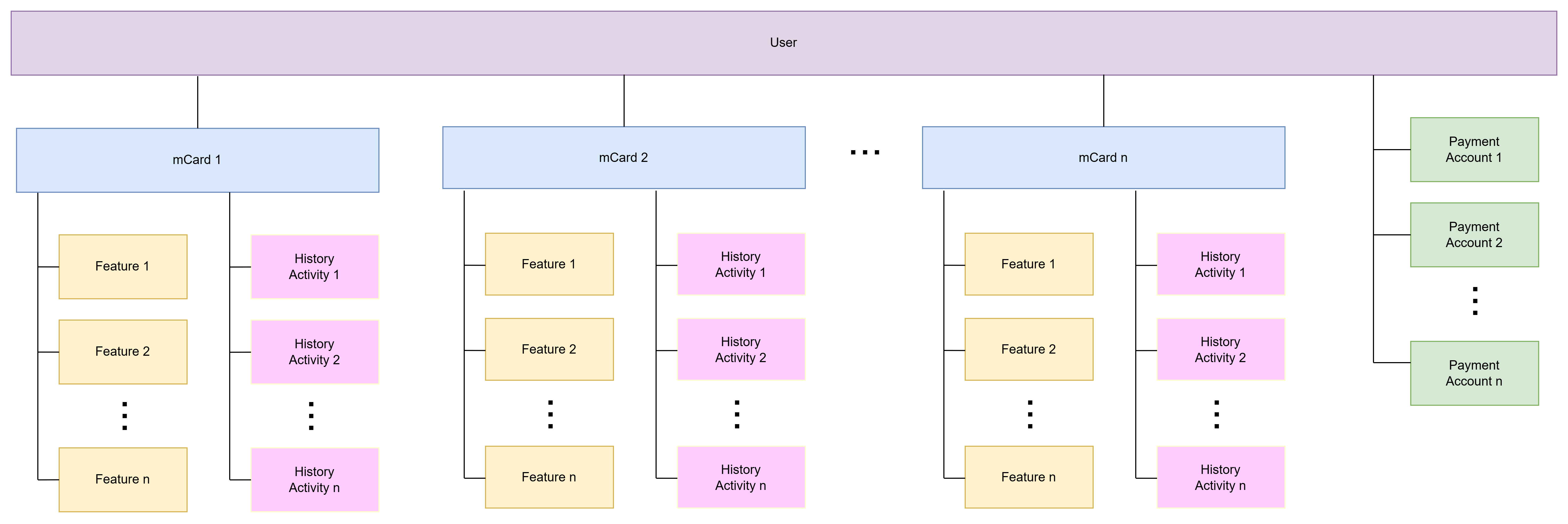
User Model
A user is created in the mCards platform the first time they authenticate. Users are identified by their auth tokens, so user IDs never need to be passed. The following attributes apply to a User.
- Users are the highest level model entity in our system
- An mCards User is primarily identified by their phone number
- Users can have multiple mCards, but most applications only utilize a single mCard
Card Model
A user can have more or more mCards. Each mCard operates independently of other mCards. Each mCard can have a unique card design. The card design used is determined by the mCard Distributor that sent the mCard to the user.
A user uses an mCard to transact at a contactless POS terminal. When they do so, the user pays for the transaction by using one or more payment accounts associated with the user. If a user has promotional funds (e.g. an mCash balance), the user transaction is funded by first using their promotional balance. If additional funds are required to pay for the transaction. then a linked payment account is used to fund the remainder.
An mCard is associated to a user when the backend to backend [create campaign endpoint] is called. The process of creating and issuing an mCard is initiated when the user successfully logs in via the Auth SDK. After that process completes, both the mCard and user are activated in the mCards platform.
An mCard exists in one of the following states: active, pending, and error. When initially issued, the mCard resides in a pending state. The mCard transitions to an active state almost immediately.
All mCards can accrue both points and mCash depending on the configuration of the Distributor’s mCards program. Points can also be converted to mCash dynamically. Each mCard has two associated mCash balances:
- Available Balance - Available balances can be used immediately.
- Held Balance - Held balances will convert to available balances after the related transactions settle.
The Card Model is related to other data models in the following way:
- History Activities are associated with a specific card
- Payment Accounts are associated with a specific card
- Features Marketplace Features are associated with a specific card
- Each card has access to multiple features - some unique and some shared
- The card’s list of available features is fully customizable
- Features can be added to cards dynamically using the Features Marketplace SDK
The Card is the primary model used by the mCards mobile SDKs, with many methods requiring a Card ID parameter.
Payment Account Model
Payment accounts are used to pay for an mCard transaction. Payment Accounts are associated with a Card, and each Card can have multiple Payment Accounts. Each Payment Account can only be used to fund transactions for the Card with which it is linked.
mCards currently support bank accounts and credit/debit cards as Payment Accounts. A bank account must be linked first before a credit card can be linked.
One Payment Account source is designated as primary. The primary account will be used first to pay for transactions. If the mCards platform cannot successfully capture funds from the primary account for any reason, the user’s remaining Payment Accounts will be used in consecutive order.
Payment Accounts can be renamed, deactivated, and reordered. Payment Accounts must first be tokenized before being added to a user’s account using our APIs. The following technologies are used to tokenize the payment accounts:
- Credit/Debit Cards - mCards currently uses Stripe to tokenize credit and debit cards as payment accounts.
- Bank accounts - mCards currently uses Plaid to tokenize a linked bank account as a payment account
The mCards team will provide associated Stripe and Plaid API keys to use in your integrations depending on the type of Payment Accounts your application will be using.
Payment gateways are used to determine which types of linked payment accounts are available to a given user.
History Activity Model
History Activities can be either user-specific and card-specific, or just user-specific. Any activity related to a user’s mCard, whether initiated by the user or not, will show up as a history activity, including transactions, points redemption, balance transfers, and so on. The History SDK provides a method for fetching paginated basic information about a user’s History Activities, and then a separate method to fetch more details about a specific History Activity.
Features Marketplace Card Feature Model
All Features Marketplace card features are card-specific, and can only be accessed after a card is associated with a user’s account. The Features Marketplace allows a user to add and remove features from their mCards. Some mCards come with default features that cannot be removed, and not all optional features are available to every card. The features available to a card are determined by the mCards platform.
Features come with their own Terms and Conditions which can be used to gate the feature so that it cannot be used unless the T&Cs are accepted. Some features may also come with subscriptions or a set number of uses.
An mCard comes with a predefined set of features. Additional features can be viewed and added to the card using the Features Marketplace SDK.
There are two primary types of features: natively implemented and secure webviews. The mCard SDKs provide data to use both types of features. Native features include send funds, convert points, and card controls. Webview features are displayed in secure webviews.
Updated 4 months ago