
Card Image Appearance
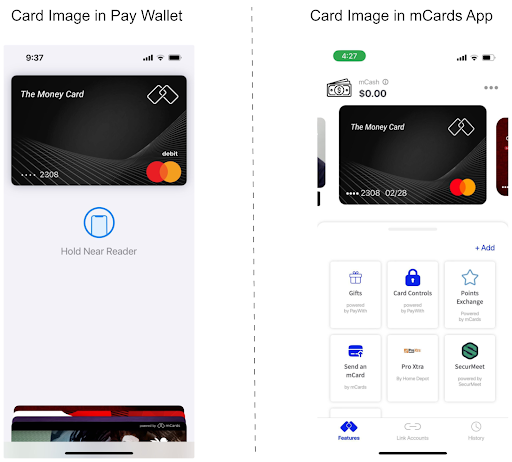
The Card Image appears in two areas:
- Pay Wallet - Apple Pay or Google Pay. This Card Image has square corners. Apple Pay and Google Pay present the Card Image in the Pay Wallet with rounded corners.
- mCards App - The mCards App carousel also displays the card art image. This Card Image has rounded corners.
The image below illustrates the appearance of the Card Art in each of these areas.
Design Guidelines for Card Image
The following are the design requirements for submitting to digital card art:
- Files should be .PNG only
- No shading or three-dimensional elements in an attempt to have the card look like a physical card
- Generic art should be avoided.
- Card background images should not include cardholder name, PAN, or expiry (either generic or actual values)
- The word “debit” needs to appear on the card.
- The card needs to be in Landscape formatting.
Card Image Assets
The Card Image assets (both square corners and rounded corners) need to meet the following specifications:
| Specification | Detail |
|---|---|
| File Format | PNG |
| Size | 1536 px X 969 px |
Template Adobe Illustrator File
A template Adobe Illustrator file is available to assist in developing the cart art. This layered template file allows a graphic artist to easily introduce the desired card art that meets all requirements. Contact your mCards sales representative for a copy of the template AI file.
Updated 6 months ago